
为你的博客添加 Alerts 提示框扩展
前言
自从使用了新的主题,里面原生的markdown写久了属实有点不太习惯,感觉里面少了很多东西,全是干巴巴的文字…
github中有一个markdown语法引得我关注了许久。那是一个提示框,主要起到用来强调下文的作用,但问题是我一直不知道那个功能怎么实现,网上也没找到相关教程,我也尝试过用remark-directive来写一套出来,还是没能做到。
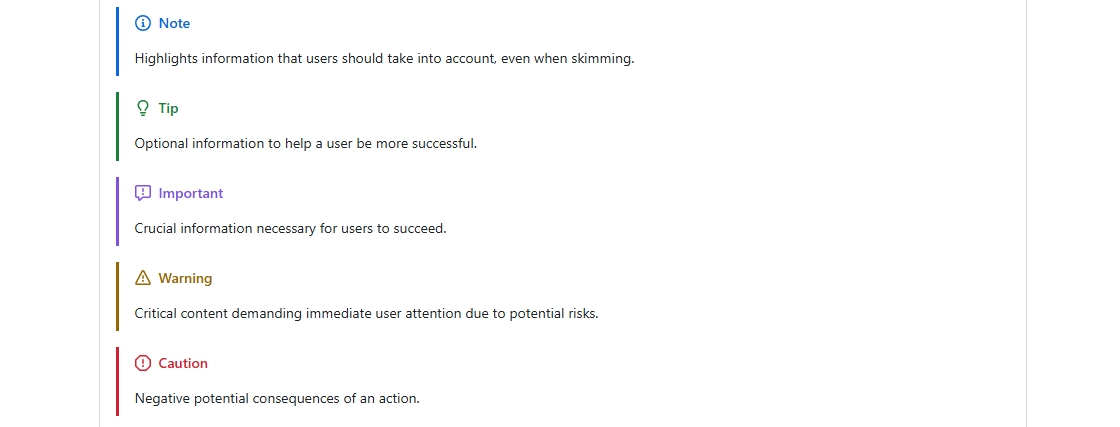
但就在最近我终于在github中找到了一个高仿项目:github-alerts
rehype plugin to create alerts (admonitions/callouts), mimicking the way alerts get rendered on github.com (based on this GitHub community “Alerts” discussion), currently 5 types of alerts are supported
它属于是 GitHub Flavored Markdown (GFM)的扩展语法,同时它也是blockquote的扩展语法,而Astro默认的Markdown解析器通常并不原生支持这个特性。
解决方案
所以现在,我们只需要在Astro中安装三个扩展包来让解析器来支持 GFM 提示框语法即可。
remark-gfm: 扩展Astro的Markdown解析器支持 GitHub Flavored Markdown 语法。 remark-directive:Markdown 的扩展语法,允许在 Markdown 中嵌入自定义指令。 rehype-github-alerts:提示语法扩展。
pnpm add remark-gfm remark-directive rehype-github-alerts --save安装完成后,在配置文件/astro.config.mjs中将这些扩展包全部导入。
当然了,该项目的作者也在文档中提供了更详细的Alerts配置教程。
import { defineConfig } from 'astro/config';
import icon from 'astro-icon';
import { SiteConfig } from './src/config.ts';

// 导入Alerts扩展语法
import remarkGfm from 'remark-gfm';
import remarkDirective from 'remark-directive';
import { rehypeGithubAlerts } from 'rehype-github-alerts';

export default defineConfig({
  markdown: {
    remarkPlugins: [ remarkGfm, remarkDirective],
    rehypePlugins: [rehypeGithubAlerts],
  },
  integrations: [icon()],
});
最后,我们直接在文章中直接使用这套语法即可!
> [!NOTE]
> Highlights information that users should take into account, even when skimming.

> [!TIP]
> Optional information to help a user be more successful.

> [!IMPORTANT]
> Crucial information necessary for users to succeed.

> [!WARNING]
> Warning information that users should pay attention to.

> [!CAUTION]
> Negative potential consequences of an action.效果展示(实际效果并不是这样的,这是我修改后的样式):
Note
Highlights information that users should take into account, even when skimming.
Tip
Optional information to help a user be more successful.
Important
Crucial information necessary for users to succeed.
Warning
Warning information that users should pay attention to.
Caution
Negative potential consequences of an action.