
Sublime Text4代码配色自定义方案
@[toc]
前言
- 关于Sublime Text对于我的使用体验,只能说内置的代码主题真的都太low了,一点都不好看。
- 所以接下来我分享一下我自定义代码配色。
- 当然,大家也可以通过我给的中文翻译注释来自定义自己喜欢的颜色。
- 废话不多说,直接上代码
- 直接将代码复制粘贴到:Preferences > Customize Color Scheme 即可。
{
	"variables":
	{
		"white": "hsl(163, 59%, 53%)",
	},
	"globals":
	{
		"foreground": "var(white)",  // 前景色
		"background": "rgb(43, 48, 56 )",  // 背景
	},
	"rules":
	[
		{
            "name": "Comment",  // 注释
            "scope": "comment, punctuation.definition.comment",
            "foreground": "var(green)"
        },
        {
            "name": "String",    // 字符串
            "scope": "string",
            "foreground": "rgb(215, 215, 215)"
        },
        {
            "name": "Punctuation",   // 符号
            "scope": "punctuation.section",
            "foreground": "var(white2)"
        },

        {
            "name": "Punctuation",  // 符号
            "scope": "punctuation.definition - punctuation.definition.numeric.base",
            "foreground": "var(blue5)"
        },
        {
            "name": "Number",    // 数字
            "scope": "constant.numeric",
            "foreground": "var(orange)"
        },
        {
            "name": "Number Suffix",    // 数字后缀
            "scope": "storage.type.numeric",
            "foreground": "var(pink)",
            "font_style": "italic"
        },
        {
            "name": "Built-in constant",    // 内置常量值
            "scope": "constant.language",
            "foreground": "var(red)",
            "font_style": "italic"
        },
          {
            "name": "User-defined constant",  // 用户定义的常量
            "scope": "constant.character, constant.other",
            "foreground": "var(pink)"
        },
          {
            "name": "Member Variable",     // 成员变量
            "scope": "variable.member",
            "foreground": "var(red)"
        },
          {
            "name": "Keyword",    // 关键字
            "scope": "keyword - keyword.operator, keyword.operator.word",
            "foreground": "rgb(255, 138, 232)"
        },
        {
            "name": "Operators",   // 运算符号
            "scope": "keyword.operator",
            "foreground": "rgb(239, 239, 239)"
        },
                {
            "name": "Punctuation",    //标点符号(分号)
            "scope": "punctuation.separator, punctuation.terminator",
            "foreground": "var(blue6)"
        },
        {
            "name": "Storage",    // 储存器(public)
            "scope": "storage",
            "foreground": "rgb(255, 84, 90)"
        },
        {
            "name": "Storage type",   // 储存器类型(void)
            "scope": "storage.type",
            "foreground": "rgb(255, 140, 161)",
            "font_style": "italic"
        },
        {
            "name": "Inherited class", // 继承类
            "scope": "entity.other.inherited-class",
            "foreground": "var(blue5)",
            "font_style": "italic"
        },
        {
            "name": "Function argument",   // 函数参数
            "scope": "variable.parameter",
            "foreground": "var(orange)"
        },
        {
            "name": "Language variable",  // 语言变量
            "scope": "variable.language",
            "foreground": "var(red)",
            "font_style": "italic"
        },
        {
            "name": "Tag name",  // 标签名称
            "scope": "entity.name.tag",
            "foreground": "var(red)"
        },
        {
            "name": "Function call",   // 函数调用(方法)
            "scope": "variable.function, variable.annotation",
            "foreground": "rgb(253, 226, 102)"
        },
        {
            "name": "Library class/type",  // 库函数/类类型
            "scope": "support.type, support.class",
            "foreground": "var(blue)",
            "font_style": "italic"
        },
        {
            "name": "CSS Properties",
            "scope": "support.type.property-name",
            "foreground": "var(white3)"
        },

	]
}
Settings设置
- 顺便把用户设置也改一下(Preferences > Settings)
{
	"ignored_packages":
	[
		"Package Control",
		"Vintage",
	],
	"index_files": true,
	"font_size": 15,
	"theme": "Default Dark.sublime-theme",
	"color_scheme": "Mariana.sublime-color-scheme",
	"dark_color_scheme": "Sixteen.sublime-color-scheme",
	"light_color_scheme": "Mariana.sublime-color-scheme",

	"caret_style": "smooth", // 光标样式
	"line_padding_top": 1,    // 行高
	//"font_face": "JetBrains Mono Medium",  // 字体样式
	"auto_complete": true,        // 代码提示

}
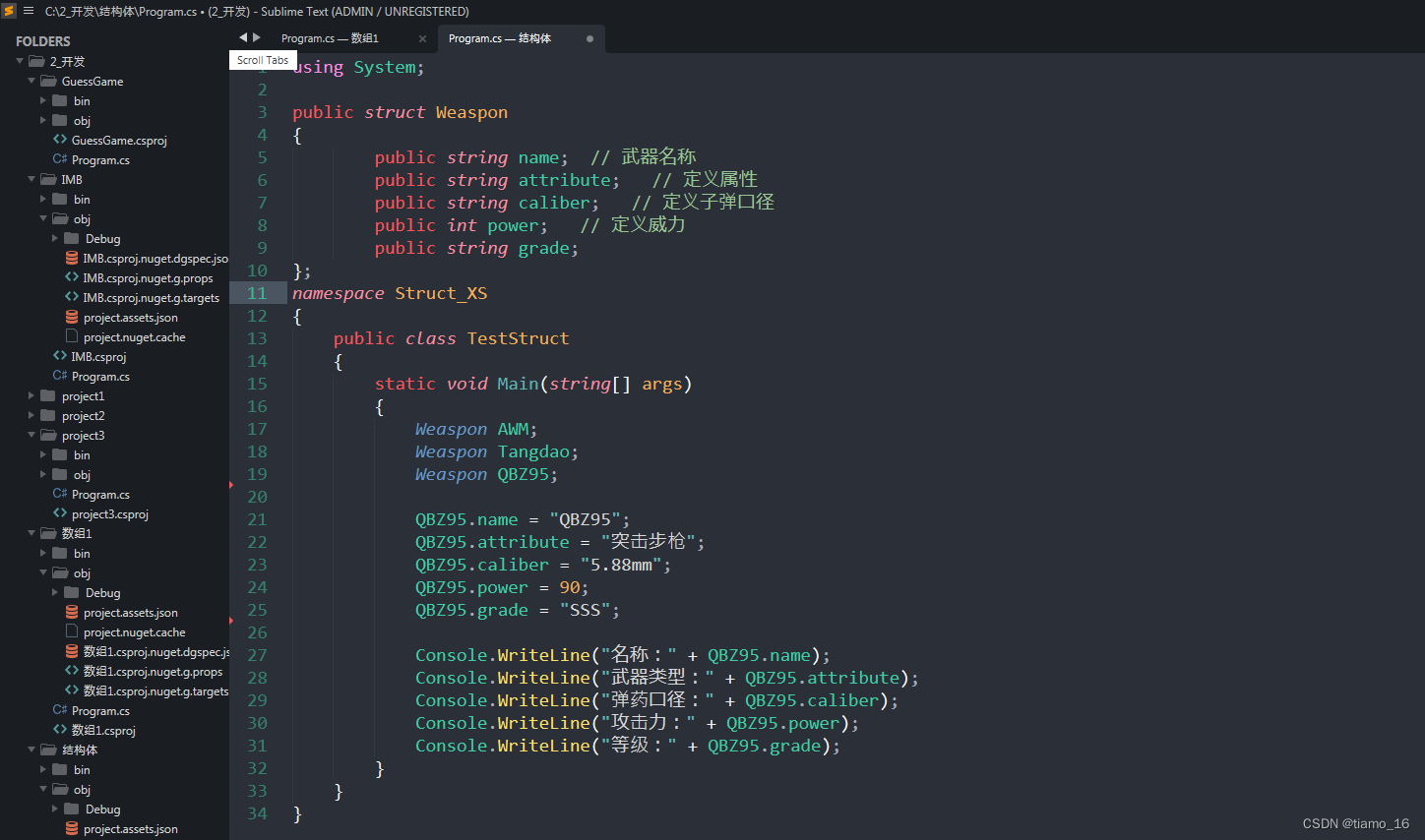
效果图
在这里插入图片描述
评论
正在加载评论...