Butterfly美化方案【进阶】
页面
标签页面
1 . 创建标签页面
hexo new page tags2 . 将index.md的内容修改下面内容:
---
title: 标签
date: 2024-07-18 10:14:31
type: "tags"
top_img: false
---
分类页面
1 . 创建分类页面
hexo new page categories2 . 将index.md的内容修改下面内容:
---
title: 分类
date: 2024-07-18 10:14:10
type: "categories"
top_img: false
---
友链页面
1 . 创建友链页面
hexo new page link2 . 将index.md的内容修改下面内容:
---
date: 2024-07-17 14:59:33
type: 'link'
top_img: false
---


## ✨申请友链

>欢迎交换友链,您可以按照以下格式在评论区打出申请信息

### 注意
☑️若后期您的站点无法访问,这里会自动将其列入失联名单中。
☑️针对部分存在资源加密的站点,尽可能在申请信息后面添加一个`siteshot: `截图链接,以便我们获取到站点的首页
3 . 修改文件:source/layout/includes/page/flink.pug
#article-container
  if top_img === false
    h1.page-title= page.title
  .flink
    if site.data.link
      each i in site.data.link
        if i.class_name
          h2!= i.class_name
        if i.class_desc
          .flink-desc!=i.class_desc
        if i.flink_style === 'butterfly'
          .butterfly-flink-list
            - let randomList = i.link_list.slice()
            if i.random
              - randomList.sort(() => Math.random() - 0.5)
            each item in randomList
              .flink-list-item
                a(href=url_for(item.link)  title=item.name target="_blank")
                  .flink-item-icon
                    if theme.lazyload.enable
                      img.nolazyload(data-lazy-src=url_for(item.avatar) onerror=`this.onerror=null;this.src='` + url_for(theme.error_img.flink) + `'` alt=item.name )
                    else
                      img.nolazyload(src=url_for(item.avatar) onerror=`this.onerror=null;this.src='` + url_for(theme.error_img.flink) + `'` alt=item.name )
                  .flink-item-info
                    .flink-item-name= item.name
                    .flink-item-desc(title=item.descr)= item.descr
        else if i.flink_style === 'flexcard'
          .flexcard-flink-list
            - let randomList = i.link_list.slice()
            if i.random
              - randomList.sort(() => Math.random() - 0.5)
            each item in randomList
              a.flink-list-card(href=url_for(item.link) target='_blank' data-title=item.descr)
                .wrapper.cover
                  - var siteshot = item.siteshot ? url_for(item.siteshot) : 'https://s0.wp.com/mshots/v1/' + item.link + '?w=400&h=300'
                  if theme.lazyload.enable
                    img.cover.fadeIn.nolazyload(data-lazy-src=siteshot onerror=`this.onerror=null;this.src='` + url_for(theme.error_img.post_page) + `'` alt='' )
                    img.cover.fadeIn.nolazyload(data-lazy-src=avatar onerror=`this.onerror=null;this.src='` + url_for(theme.error_img.post_page) + `'` alt='' )
                  else
                    img.cover.fadeIn.nolazyload(src=siteshot onerror=`this.onerror=null;this.src='` + url_for(theme.error_img.post_page) + `'` alt='' )
                    img.cover.fadeIn.nolazyload(data-lazy-src=avatar onerror=`this.onerror=null;this.src='` + url_for(theme.error_img.post_page) + `'` alt='' )
                .info
                  if theme.lazyload.enable
                    img.flink-avatar.nolazyload(data-lazy-src=url_for(item.avatar) onerror=`this.onerror=null;this.src='` + url_for(theme.error_img.flink) + `'` alt='' )
                  else
                    img.nolazyload(src=url_for(item.avatar) onerror=`this.onerror=null;this.src='` + url_for(theme.error_img.flink) + `'` alt='' )
                  span.flink-sitename= item.name
        else if i.flink_style === 'volantis'
          .volantis-flink-list
            - let randomList = i.link_list.slice()
            if i.random
              - randomList.sort(() => Math.random() - 0.5)
            each item in randomList
              a.site-card(target='_blank' rel='noopener' href=url_for(item.link))
                .img
                  - var siteshot = item.siteshot ? url_for(item.siteshot) : 'https://s0.wp.com/mshots/v1/' + item.link + '?w=400&h=300'
                  img.nolazyload.no-lightbox(src=siteshot onerror=`this.onerror=null;this.src='` + url_for(theme.error_img.post_page) + `'` alt='' )
                .info
                  img.nolazyload.no-lightbox(src=url_for(item.avatar) onerror=`this.onerror=null;this.src='` + url_for(theme.error_img.flink) + `'` alt='' )
                  span.title= item.name
                  span.desc(title=item.descr)= item.descr
        else if i.flink_style === 'byer'
          .byer-flink-list
            - let randomList = i.link_list.slice()
            if i.random
              - randomList.sort(() => Math.random() - 0.5)
            each item in randomList
              .flink-list-item
                a(href=url_for(item.link)  title=item.name target="_blank")
                  .flink-item-bar
                    sapn.flink-item-bar-yellow
                    sapn.flink-item-bar-green
                    sapn.flink-item-bar-red
                    sapn.flink-item-bar-x +
                  .flink-item-content
                    .flink-item-text
                      .flink-item-name= item.name
                      .flink-item-desc(title=item.descr)= item.descr
                    .flink-item-icon
                      img.no-lightbox(src=url_for(item.avatar) onerror=`this.onerror=null;this.src='` + url_for(theme.error_img.flink) + `'` alt=item.name )
        else if i.flink_style === 'ark'
          .ark-flink-list
            - let randomList = i.link_list.slice()
            if i.random
              - randomList.sort(() => Math.random() - 0.5)
            each item in randomList
              a.ark-flink-list-card(href=url_for(item.link) target='_blank' title=item.descr)
                .ark-flink-progress-bar-A
                .ark-flink-progress-bar-B
                .ark-flink-progress-bar-C
                .ark-flink-content
                  .ark-flink-name
                    .flink-sitename= item.name
                    .flink-block
                  .ark-flink-avatar
                    img.no-lightbox(src=url_for(item.avatar) onerror=`this.onerror=null;this.src='` + url_for(theme.error_img.flink) + `'` alt='' )
                  .ark-flink-mask
                    .ark-flink-mask-left
                    .ark-flink-mask-right
                  .ark-flink-descr
                    .ark-flink-descr-text=item.descr
                  .ark-flink-siteshot
                    - var siteshot = item.siteshot ? url_for(item.siteshot) : 'https://s0.wp.com/mshots/v1/' + item.link + '?w=400&h=300'
                    img.no-lightbox(src=siteshot onerror=`this.onerror=null;this.src='` + url_for(theme.error_img.post_page) + `'` alt='' )

    != page.content
4 . 修改文件:source/css/_page/flink.styl
.flink-desc
margin: .2rem 0 .5rem
//bf原生
.butterfly-flink-list
overflow: auto
padding: 10px 10px 0
text-align: center
border-radius: 12px
border: 1px dashed black
& > .flink-list-item
position: relative
float: left
overflow: hidden
line-height: 17px
-webkit-transform: translateZ(0)
height: 100px;
padding: 10px;
width: calc(100% / 3 - 0.5rem)
margin: 0.5rem 0.25rem;
border-radius: 12px;
border: var(--style-border);
-webkit-transition: all .3s ease-in-out;
-moz-transition: all .3s ease-in-out;
-o-transition: all .3s ease-in-out;
-ms-transition: all .3s ease-in-out;
transition: all .3s ease-in-out;
+maxWidth1200()
width: calc(50% - 15px) !important
+maxWidth600()
width: calc(100% - 15px) !important
&:hover
border-color: #101010 !important;
background-color: rgba(255, 255, 255, .4);
box-shadow: 0px 7px 30px 0px rgba(100, 100, 111, 0.2);
text-decoration: none;
.flink-item-icon
width: 0;
height: 0;
margin-left: -10px;
&:hover:before,
&:focus:before,
&:active:before
transform: scale(1)
a
color: var(--font-color)
text-decoration: none
.flink-item-icon
float: left
overflow: hidden
margin: 15px 10px
width: 60px
height: 60px
transition: all .3s ease-out
margin: 8px 0 8px 0;
overflow: hidden;
img
width: 100%
height: 100%
transition: filter 375ms ease-in .2s, transform .3s
object-fit: cover
.img-alt
display: none
.flink-item-info
display: flex;
flex-wrap: wrap;
padding-left: 10px;
text-align: left;
flex-direction: column;
.flink-item-name
@extend .limit-one-line
padding: 12px 0 16px 0;
height: auto;
font-weight: bold
font-size: 1.2em
.flink-item-desc
@extend .limit-one-line
padding: 0
height: 35px
font-size: .93em
opacity: .7;
word-break: break-all;
white-space: break-spaces;
display: -webkit-box;
overflow: hidden;
-webkit-box-orient: vertical;
-webkit-line-clamp: 2;
.flink-name
margin-bottom: 5px
font-weight: bold
font-size: 1.5em
//flexcard卡片
#article-container img
margin-bottom: 0.5rem;
object-fit: cover;
max-height: 900px;
.flexcard-flink-list
overflow hidden
.flink-list-card
.wrapper img
transition: transform .5s ease-out !important;
& > a
width: calc(100% / 5 - 0.5rem);
height 150px
position relative
display block
margin: 0.5rem 0.25rem;
float left
overflow hidden
padding: 0;
border-radius: 8px;
transition all .3s ease 0s, transform .6s cubic-bezier(.6, .2, .1, 1) 0s
box-shadow none
border: var(--style-border)!important;
&:hover
.info
transform translateY(-100%)
.wrapper
img
transform scale(1.2)
&::before
position: fixed
width:inherit
margin:auto
left:0
right:0
top:10%
border-radius: 10px
text-align: center
z-index: 100
content: attr(data-title)
font-size: 20px
color: #fff
padding: 10px
background-color: rgba($theme-color,0.8)
.cover
width 100%
transition transform .5s ease-out
.wrapper
position relative
.fadeIn
animation coverIn .8s ease-out forwards
img
height 150px
pointer-events none
.info
display flex
flex-direction column
justify-content center
align-items center
width 100%
height 100%
overflow hidden
border-radius 3px
background-color hsla(0, 0%, 100%, .7)
transition transform .5s cubic-bezier(.6, .2, .1, 1) 0s
img
position relative
top 45px
width 80px
height 80px
border-radius 50%
box-shadow 0 0 10px rgba(0, 0, 0, .3)
z-index 1
text-align center
pointer-events none
span
padding 20px 10% 60px 10%
font-size 16px
width 100%
text-align center
box-shadow 0 0 10px rgba(0, 0, 0, .3)
background-color hsla(0, 0%, 100%, .7)
color var(--font-color)
white-space nowrap
overflow hidden
text-overflow ellipsis
.flexcard-flink-list>a .info,
.flexcard-flink-list>a .wrapper .cover
position absolute
top 0
left 0
@media screen and (max-width:1024px)
.flexcard-flink-list
& > a
width calc(33.33333% - 15px)
@media screen and (max-width:600px)
.flexcard-flink-list
& > a
width calc(50% - 15px)
[data-theme=dark]
.flexcard-flink-list a .info,
.flexcard-flink-list a .info span
background-color rgba(0, 0, 0, .6)
.flexcard-flink-list
& > a
&:hover
&:before
background-color: rgba(#121212,0.8);
.justified-gallery > div > img,
.justified-gallery > figure > img,
.justified-gallery > a > a > img,
.justified-gallery > div > a > img,
.justified-gallery > figure > a > img,
.justified-gallery > a > svg,
.justified-gallery > div > svg,
.justified-gallery > figure > svg,
.justified-gallery > a > a > svg,
.justified-gallery > div > a > svg,
.justified-gallery > figure > a > svg
position static!important
trans($time = 0.28s)
transition: all $time ease
-moz-transition: all $time ease
-webkit-transition: all $time ease
-o-transition: all $time ease
//volantis卡片,我的最爱
.volantis-flink-list
display: flex
flex-wrap: wrap
justify-content: flex-start
margin: -0.5 * 16px
align-items: stretch
.site-card
margin: 16px * 0.5
width: "calc(100% / 4 - %s)" % 16px
@media screen and (min-width: 2048px)
width: "calc(100% / 5 - %s)" % 16px
@media screen and (max-width: 768px)
width: "calc(100% / 3 - %s)" % 16px
@media screen and (max-width: 500px)
width: "calc(100% / 2 - %s)" % 16px
display: block
line-height: 1.4
height 100%
.img
width: 100%
height 150px
@media screen and (max-width: 500px)
height 100px
overflow: hidden
border-radius: 12px * 0.5
box-shadow: 0 1px 2px 0px rgba(0, 0, 0, 0.2)
background: #f6f6f6
img
width: 100%
height 100%
pointer-events:none;
// trans(.75s)
transition: transform 2s ease
object-fit: cover
.info
margin-top: 16px * 0.5
img
width: 32px
height: 32px
pointer-events:none;
border-radius: 16px
float: left
margin-right: 8px
margin-top: 2px
span
display: block
.title
font-weight: 600
font-size: var(--global-font-size)
color: #444
display: -webkit-box
-webkit-box-orient: vertical
overflow: hidden
-webkit-line-clamp: 1
trans()
.desc
font-size: var(--global-font-size)
word-wrap: break-word;
line-height: 1.2
color: #888
display: -webkit-box
-webkit-box-orient: vertical
overflow: hidden
-webkit-line-clamp: 2
.img
trans()
&:hover
.img
box-shadow: 0 4px 8px 0px rgba(0, 0, 0, 0.1), 0 2px 4px 0px rgba(0, 0, 0, 0.1), 0 4px 8px 0px rgba(0, 0, 0, 0.1), 0 8px 16px 0px rgba(0, 0, 0, 0.1)
.info .title
color: #ff5722
//byer卡片
#article-container
.flink
margin-bottom: 20px
.byer-flink-list
overflow: auto
padding: 10px 10px 0
text-align: center
& > .flink-list-item
position: relative
background: #ffffff
float: left
overflow: hidden
margin: 15px 7px
width: calc(100% / 3 - 15px)
height: 120px
border-radius: 2px
line-height: 17px
-webkit-transform: translateZ(0)
border: 1px solid
box-shadow: 3px 3px 1px 1px #fee34c;
+maxWidth1024()
width: calc(50% - 15px) !important
+maxWidth600()
width: calc(100% - 15px) !important
a
color: var(--font-color)
text-decoration: none
.flink-item-bar
height: 15px
border-width: 0 0 1px 0
border-style: none none solid none
background: #fde135
display: flex;
align-items: center;
flex-direction: row;
flex-wrap: nowrap;
padding: 0 3px 0 3px
sapn
width: 10px;
height: 10px;
margin: 0 1px 0 1px
border-radius: 50%;
display: block;
border: 1px solid;
display: flex;
align-items: center;
justify-content: flex-start;
&.flink-item-bar-yellow
background: #fde135
&.flink-item-bar-green
background: #249a33
&.flink-item-bar-red
background: #f13b06
&.flink-item-bar-x
background: transparent
border: 0px
margin-left: auto
transform: rotate(45deg);
font-size: 23px;
padding: 0px 0px 6px 0px;
.flink-item-content
display: flex;
height: 105px
flex-direction: row;
align-items: center;
justify-content: space-between;
padding: 0 5px 0 5px;
.flink-item-text
width: 60%;
display: flex;
flex-direction: column;
align-items: center;
.flink-item-name
@extend .limit-one-line
max-width: 100%;
padding: 0px 5px 0px 5px;
margin: 0px 0 6px 0;
height: 50%;
font-weight: bold;
font-size: 1.43em;
border-width: 0 0 7px 0;
border-style: solid;
border-color: #fbf19f;
.flink-item-desc
@extend .limit-one-line
max-width: 100%;
height: 50%;
padding: 5px 5px 5px 5px;
font-size: 0.93em;
position: relative
&:before
content: "";
background: transparent;
display: block;
height: calc(100% - 4px);
width: calc(100% - 4px);
position: absolute;
left: 0;
top: 0;
border-radius: 2px;
border: 1px solid;
clip-path: polygon(0 0, 100% 0, 100% 100%, 95% 100%, 95% 50%, 90% 50%, 90% 100%, 0 100%);
.flink-item-icon
overflow: hidden;
margin: 0px 5px;
width: 70px;
height: 70px;
border: 1px solid;
border-radius: 2px;
transition: width .3s ease-out
box-shadow: 2px 2px 1px 1px #fee34c;
img
width: 50px;
height: 50px;
margin: 9px 9px;
transition: filter 375ms ease-in .2s, transform .3s
object-fit: cover
.img-alt
display: none
//byer卡片暗夜模式改造
[data-theme=dark]
#article-container
.flink
.byer-flink-list
& > .flink-list-item
background: rgb(40,40,40)
box-shadow: 3px 3px 1px 1px #1B5A70;
a
.flink-item-bar
background: #1B5A70;
.flink-item-content
.flink-item-text
.flink-item-name
border-color: #5EBAD9;
.flink-item-icon
box-shadow: 2px 2px 1px 1px #1B5A70;
//下面是aki及其自定义配色:
:root
--ark-flink-default-color: rgba(153, 54, 44,0.8) /*主色调*/
--ark-flink-mask: #818181 /*遮罩层配色*/
--ark-flink-progress-default: rgba(227, 236, 238, 0.8) /*能量条默认配色*/
--ark-flink-progress-charge: #d97f17 /*能量条充能配色*/
--flink-name-border-color: #d97f17 /*ID边框配色*/
[data-theme="dark"]
--ark-flink-default-color: rgba(55, 112, 143,0.8)
--ark-flink-mask: #37708f
--ark-flink-progress-default: rgba(46, 160, 221, 0.8)
--ark-flink-progress-charge: rgba(227, 236, 238, 0.8)
--flink-name-border-color: rgba(227, 236, 238, 0.8)
//适配ark方舟友链卡片
#article-container
.flink
margin-bottom: 20px
.ark-flink-list
overflow: auto
padding: 10px 10px 0
text-align: center
& > .ark-flink-list-card
position: relative
display: block
color: var(--font-color)
text-decoration: none
float: left
overflow: hidden
margin: 15px 7px
width: calc(100% / 3 - 15px)
height: 220px
border-radius: 2px
line-height: 17px
-webkit-transform: translateZ(0)
+maxWidth1024()
width: calc(50% - 15px) !important
+maxWidth600()
width: calc(100% - 15px) !important
a.ark-flink-list-card
*
transition: all 0.3s cubic-bezier(.6, 0, .5, 1)
&:hover
*
transition: all 0.3s cubic-bezier(.6, 0, .5, 1)
.ark-flink-progress-bar-A,
.ark-flink-progress-bar-B,
.ark-flink-progress-bar-C
background: var(--ark-flink-progress-charge)
.ark-flink-content
.ark-flink-name
bottom: 0px;
.ark-flink-avatar
transform: rotateX(90deg)
.ark-flink-mask
.ark-flink-mask-left
transition-delay: 0.3s;
left: -35%;
.ark-flink-mask-right
transition-delay: 0.3s;
right: -55%;
.ark-flink-descr
.ark-flink-descr-text
transition-delay: 0.3s;
opacity: 1
animation: ark-flink-type 1.5s steps(20, end) 0.3s,ark-flink-blink .75s step-end infinite; /* 定义光标的闪烁动画 */
.ark-flink-progress-bar-A,
.ark-flink-progress-bar-B,
.ark-flink-progress-bar-C
display: block
position: absolute;
background: var(--ark-flink-progress-default)
z-index 6
.ark-flink-progress-bar-A
height: 8px;
width: 100px;
top: 3px;
left: 6px;
clip-path: polygon(0% 100%, 8% 0%, 28% 0%, 20% 100%, 23% 100%, 31% 0%, 46% 0%, 38% 100%, 41% 100%, 49% 0%, 64% 0%, 56% 100%, 59% 100%, 67% 0%, 82% 0%, 74% 100%, 77% 100%, 85% 0%, 100% 0%, 90% 100%);
.ark-flink-progress-bar-B
height: 8px;
width: 35px;
bottom: 35px;
left: 0;
clip-path: polygon(0% 0%, 40% 0%, 15% 100%, 25% 100%, 50% 0%, 85% 0%, 60% 100%, 70% 100%, 90% 0%, 100% 100%, 15% 100%);
.ark-flink-progress-bar-C
height: 100px
width: 8px
bottom: 50px
right: 0
clip-path: polygon( 0% 0%, 100% 8%, 100% 28%, 0% 20%, 0% 23%, 100% 31%,100% 46% ,0% 38% ,0% 41% ,100% 49% ,100% 64% ,0% 56% ,0% 59% ,100% 67% ,100% 82% ,0% 74% , 0% 77%,100% 85% , 100% 100%,0% 90% );
.ark-flink-content
display: block
position: absolute
background: radial-gradient(var(--ark-flink-default-color),transparent)
width: calc(100% - 10px)
height: 100%
top: 0
left: 0
clip-path: polygon(0 15px, 100px 15px, 115px 0, calc(100% - 45px) 0, calc(100% - 15px) 45px, 100% 45px, 100% calc(100% - 25px), calc(100% - 30px) calc(100% - 25px), calc(100% - 55px) calc(100% - 10px), calc(100% - 90px) calc(100% - 10px), calc(100% - 100px) 100%, 100px 100%, 90px calc(100% - 10px), 55px calc(100% - 10px), 35px calc(100% - 45px), 0% calc(100% - 45px));
.ark-flink-avatar,
.ark-flink-mask,
.ark-flink-descr,
.ark-flink-siteshot
position: absolute
width: 100%
height: 100%
top: 0
left: 0
.ark-flink-name
display: block;
position: absolute;
z-index: 5;
bottom: 10px;
left: 20%;
color: white;
text-shadow: 1px 1px 5px black;
background: transparent;
height: 40px;
width: 60%;
border-style: double;
border-width: 5px 5px 0 5px;
border-color: var(--flink-name-border-color);
transform: perspective(0.5em) rotateX(3deg);
.flink-sitename
transform: perspective(0.5em) rotateX(-3deg);
font-size: 15px;
margin: 5px 0 0 0;
.flink-block
transform: perspective(0.5em) rotateX(-10deg);
display: block;
width: 60%;
height: 13px;
background: var(--flink-name-border-color);
position: absolute;
bottom: 0px;
left: 20%;
.ark-flink-avatar
z-index 4
display: flex
align-items: center;
justify-content: center;
transform: rotateX(0deg)
img
width: 100px;
height: 100px;
margin: 0 auto 20px;
object-fit: cover
clip-path: polygon(30% 0%, 70% 0%, 100% 30%, 100% 70%, 70% 100%, 30% 100%, 0% 70%, 0% 30%);
.img-alt
display: none
.ark-flink-mask
z-index 3
.ark-flink-mask-left
width: 100%;
height: 100%;
background: repeating-linear-gradient(0deg, var(--ark-flink-mask),transparent 1px);
clip-path: polygon(50% 0, 50% calc(50% - 60px), calc(50% - 20px) calc(50% - 60px), calc(50% - 50px) calc(50% - 30px), calc(50% - 50px) calc(50% + 10px), calc(50% - 20px) calc(50% + 40px), 50% calc(50% + 40px), 50% 100%, 0% 100%, 0% 0%);
left: 0%;
position: absolute;
.ark-flink-mask-right
background: repeating-linear-gradient(0deg, var(--ark-flink-mask),transparent 1px);
width: 100%;
height: 100%;
clip-path: polygon(100% 0%, 50% 0%, 50% calc(50% - 60px), calc(50% - 20px) calc(50% - 60px), calc(50% - 50px) calc(50% - 30px), calc(50% - 50px) calc(50% + 10px), calc(50% - 20px) calc(50% + 40px), 50% calc(50% + 40px), 50% 100%, 100% 100%);
right: 0%;
position: absolute;
.ark-flink-descr
z-index 2
display: flex
align-items: center;
justify-content: center;
.ark-flink-descr-text
color: white;
text-shadow: 1px 1px 5px black;
font-size: 1.5em;
height: 1.5em;
line-height: 1.5em;
overflow: hidden; /* 隐藏超出容器的文本 */
border-right: .15em solid orange; /* 打字效果的光标动画 */
white-space: nowrap; /* 确保文本在一行内显示,不换行 */
margin: 20px;
opacity: 0
.ark-flink-siteshot
z-index 1
display: flex
align-items: center;
justify-content: center;
img
height: 75%;
width: 100%;
margin: 0 auto 20px;
object-fit: cover;
/* 定义打字机动画 */
@keyframes ark-flink-type
from
width: 0;
to
width: 100%;
/* 定义光标闪烁动画 */
@keyframes ark-flink-blink
from,
to
border-color: transparent;
50%
border-color: orange
温馨提示:一般而言,归档(archives)页面是不用创建的,它会自动生成。 另外:
top_img:是用于开关页面顶部的封面,可按需求使用。
我的装备页面
该模板的好处是:不需要在外部嵌入css和修改yml,而是直接在md中嵌入了css,完全一步操作。 预览:我的装备
1 . 创建我的装备页面
hexo new page equipment2 . 将index.md的内容修改下面内容:
---
title: 🎒我的装备
date: 2024-11-16 10:20:54
aside: false
type: equipment
---
<style>
  .container {
    display: flex;
    flex-wrap: wrap;
    justify-content: space-around;
    padding: 10px;
  }
  .box {
    flex: 1;
    min-width: 180px; /* 最小宽度,可以根据实际情况调整 */
    margin: 10px;
    height: auto;
    overflow: hidden;
    border-radius:12px;
    -webkit-transition: all 0.28s ease;
  }

  .box:hover{
    box-shadow: 0px 7px 30px 0px rgba(100, 100, 111, 0.2) ;
  }
  .only-img {
    width: auto;
    height: 200px;
    display: block;
    border-radius: 0;
  }
  #beizhu{
    font-size: 12px;
    margin-top: -17px;
    font-weight: normal;
    color: #7e7e7e;
  }
  .description {
    padding: 0px 0px 15px 15px
  }
  @media (max-width: 768px) {
    .box {
      flex-basis: 100%; /* 在小屏幕上,每个盒子占满整个宽度 */
    }
  }
</style>
<div class="container">
  <div class="box">
    <img src="https://shopstatic.vivo.com.cn/vivoshop/commodity/43/10009543_1713769003117_750x750.png.webp" alt="图片项目1">
    <div class="description">
      <h3>IQOO Z9</h3>
      <h4 id="beizhu">12G / 256GB</h4>
      <p>6000mAh电池|第三代骁龙 7|144Hz 防频闪护眼屏</p>
    </div>
  </div>
  <div class="box">
    <img src="/img/other/p15.png" alt="图片2">
    <div class="description">
      <h3>Colorful P15</h3>
      <h4 id="beizhu">i5-12450H / RTX-4050</h4>
      <p>搭载4050和十二代处理器,具有较高的性能。</p>
    </div>
  </div>
  <div class="box">
    <img src="/img/other/k87pro.png" alt="图片3">
    <div class="description">
      <h3>凌豹 K87 Pro</h3>
      <h4 id="beizhu">三模 / 热插拔</h4>
      <p>三模Gasket热插拔机械键盘,二次元主题配色...</p>
    </div>
  </div>
  <div class="box">
    <img src="https://rpw.rapoo.cn/goods/gallery/1718789069269.jpg" alt="图片3">
    <div class="description">
      <h3>Repoo VH300S</h3>
      <h4 id="beizhu">Unreal7.1 / 40mm</h4>
      <p>虚拟7.1声道音效,40mm发声单元...
</p>
    </div>
  </div>
</div>
页面FPS监测
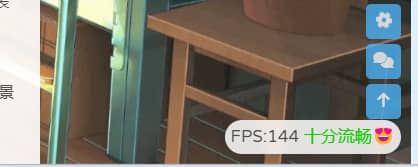
任意页面显示当前页面的FPS帧数,对于不同的fps大小会有不同的显示效果。
效果:
本教程参考了青稚的:Butterfly主题美化
1 . 在source/css/目录新建一个样式文件fps.css输入以下代码:
/* 帧率检测 */
#fps {
    position: fixed;
    right: 10px;
    bottom: 10px;
    z-index: 1919810
}
/*Light*/
[data-theme=light] #fps {
    background-color: rgba(255,255,255,.85);
    backdrop-filter: blur(5px) saturate(150%);
    padding: 0 6px;
    border-radius: 20px
}
/*Dark*/
[data-theme=dark] #fps {
    background-color: rgba(0,0,0,.72);
    backdrop-filter: blur(5px) saturate(150%);
    padding: 0 6px;
    border-radius: 20px
}
2 . 在source/js/目录新建一个样式文件fps.js输入以下代码:
document.addEventListener('pjax:complete', fps);
document.addEventListener('DOMContentLoaded', fps);
function fps(){
// if(window.localStorage.getItem("fpson")=="1"){
//如果要使博客设置上面的设置项能生效,就把上面一行取消注释
var rAF = function () {
    return (
        window.requestAnimationFrame ||
        window.webkitRequestAnimationFrame ||
        function (callback) {
            window.setTimeout(callback, 1000 / 60);
        }
    );
}();
var frame = 0;
var allFrameCount = 0;
var lastTime = Date.now();
var lastFameTime = Date.now();
var loop = function () {
    var now = Date.now();
    var fs = (now - lastFameTime);
    var fps = Math.round(1000 / fs);

    lastFameTime = now;
    // 不置 0,在动画的开头及结尾记录此值的差值算出 FPS
    allFrameCount++;
    frame++;

    if (now > 1000 + lastTime) {
        var fps = Math.round((frame * 1000) / (now - lastTime));
        if(fps<=5){
            var kd=`<span style="color:#ff1b1b">卡成ppt🤢</span>`
        }
        else if(fps<=15){
            var kd=`<span style="color:red">电竞级帧率😖</span>`
        }
        else if(fps<=25){
            var kd=`<span style="color:yellow">有点难受😨</span>`
        }
        else if(fps<35){
            var kd=`<span style="color:orange">不太流畅🙄</span>`
        }
        else if(fps<=45){
            var kd=`<span style="color:#59d8ef">还不错哦😁</span>`
        }
        else{
            var kd=`<span style="color:#0ace00">十分流畅😍</span>`
        }
        document.getElementById("fps").innerHTML=`FPS:${fps} ${kd}`;
        frame = 0;
        lastTime = now;
    };

    rAF(loop);
}

loop();
// }
// else{$("#fps").hide()}
//如果要使博客设置上面的设置项能生效,就把上面两行取消注释
}
3 . 最后在主题配置文件.config.yml中将其引入即可。
Live2d看板娘
看板娘不仅可以使页面充满活力,闲着没事与她互动也能够消除烦恼哦!赶快将其领回家吧!
1 . 安装插件:live2d-widget
2 . 将解压到theme/butterfly/source目录。
3 . 打开该插件目录中的autoload.js文件(这里开始修改配置代码)。
4 . 根据作者的推荐将代码:const live2d_path的路径改为绝对路径。也就是本地路径。
const live2d_path = "/live2d-widget/";5 . 再将修改初始化配置项initWidget中的cdnPath代码路径,原路径是作者的api,但是正常情况下是需要挂VPN的,而且提供的皮肤模型很少,这里可以改成Akilarの糖果屋提供的api接口,里面提供了大量的皮肤模型…
cdnPath: "https://npm.elemecdn.com/akilar-live2dapi@latest/",6 . 最后在主题配置文件_config.yml将js引入即可。
- <script src="/live2d-widget/autoload.js"></script>主页
打开文件:source\css\_page\homepage.styl
文章列表样式
1 .你可以在这里修改主页文章列表区块的样式
2 . 修改文章列表的边框样式,例如:
  & > .recent-post-item
    @extend .cardHover
    display: flex
    flex-direction: row
    align-items: center
    overflow: hidden
    height: 15em          ## 修改高度
    border-radius:12px    ## 修改圆角曲度
3 . 修改文章列表中的内容字体大小,例如:
      & > .content
        @extend .limit-more-line
        -webkit-line-clamp: 2
        font-size: 15px        ## 自定义内容字体大小
导航栏
选项居中化
1 . 魔改参考文章:buterfly博客导航栏居中 2 . 实现原理是将选项卡向左边移动50%居中,并将子选项卡反方向旋转50%,这样子选项卡的排列方式就成了横向的,在此期间,我们还要将子选项卡与父选项卡保持对其,需要单独调整各个选项卡的位置。由于宽度限制,我们还需要设置white-space: nowrap;样式,这样即使宽度不够,选项卡也不会强制换行。最后我还在原基础上添加了过渡动画
#nav .menus_items {
    position: absolute;
    width: fit-content;
    white-space: nowrap;  /*强制不换行*/
    left: 50%;
    transform: translateX(-50%);
}

#nav .menus_items .menus_item:hover .menus_item_child {
    display: flex;
    border-radius: 15px;
}

#nav .menus_items .menus_item .menus_item_child li {
    border-radius: 15px;
}

#nav .menus_items .menus_item .menus_item_child li:first-child {
    border-radius: 15px;
}

#nav .menus_items .menus_item .menus_item_child li:last-child {
    border-radius: 15px;
}

#nav .menus_items .menus_item .menus_item_child li {
    transition: all 0.5s ease 0s;
}

#nav .menus_items .menus_item .menus_item_child li:hover {
    background-color: #ffcfe4;
}

/* 这里的2是代表导航栏的第二个元素,即有子菜单的元素,可以按自己需求修改 */
.menus_items .menus_item:nth-child(1) .menus_item_child {
    left: -65px;
}

.menus_items .menus_item:nth-child(2) .menus_item_child {
    left: -110px;
}

.menus_items .menus_item:nth-child(3) .menus_item_child {
    left: -110px;
}

.menus_items .menus_item:nth-child(4) .menus_item_child {
    left: -40px;
}

.menus_items .menus_item:nth-child(5) .menus_item_child {
    left: -75px;
}

#nav .site-page:not(.child):after {
    border: 15px;
}
使用阿里云图标
1 . 前往阿里云图标官网Iconfont:https://iconfont.cn/ 2 . 将你喜欢的图标加入购物车,随后添加到自己的项目(前提是需要登录)
图标
默认是灰色的,如果要保持图标是彩色的,需要在项目设置中勾选彩色选项
3 . 随后,点击Font Class,生成链接,并打开链接,把页面中的代码复制出来。
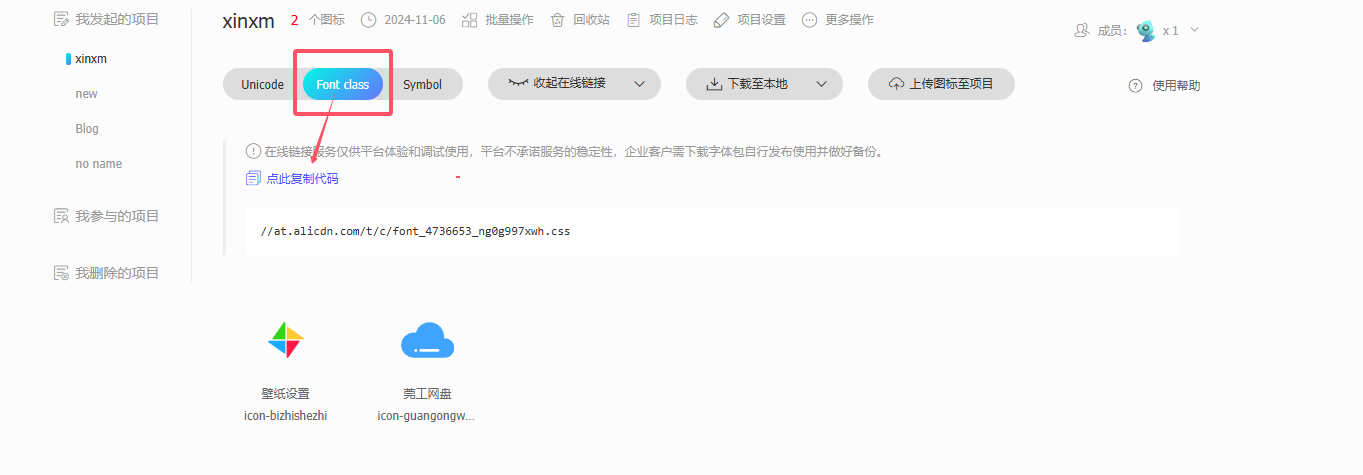
4 . 新建一个样式文件font.css,把代码粘贴进去。
5 . 在主题位置文件中,将其引入。
# Inject
# Insert the code to head (before '</head>' tag) and the bottom (before '</body>' tag)
inject:
  head:
    - <link rel="stylesheet" href="/css/font.css">
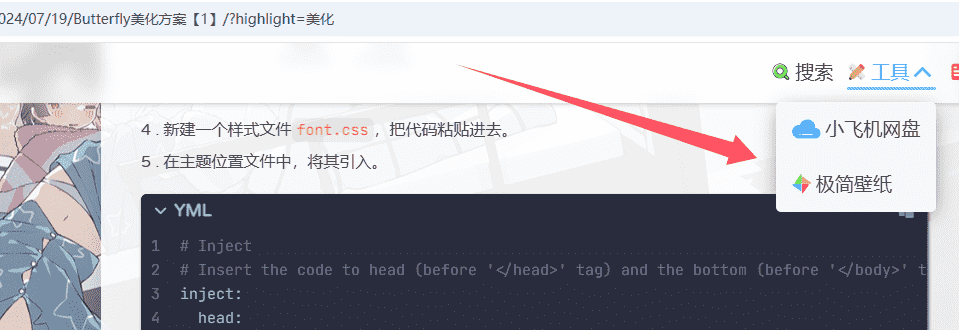
6 . 最后,我们就可以根据代码来将图标更改为阿里图标了。
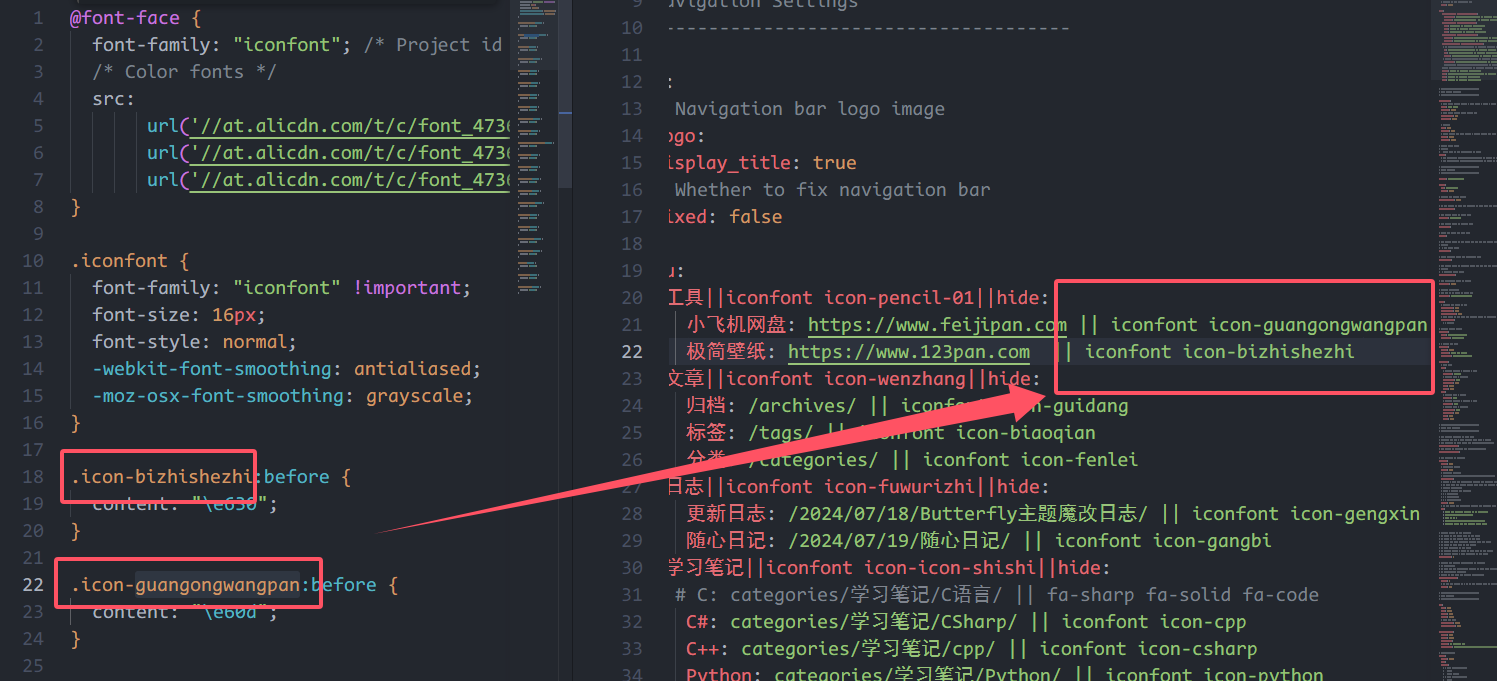 7 . 可以看到,阿里的彩色图标成功换上啦!
网站名称及字体大小
新建文件:source/css/custom.css(可在该文件中自定义主页中任何元素)
.menus_item { font-size: 20px;}     // 自定义导航栏字体大小
.site-name { font-size: 23px;}      // 自定义左上角名称大小
导航栏圆角框及缩短居中效果
新建文件:source/css/custom.css(可在该文件中自定义主页中任何元素)
#nav
{
    width: 95%;     // 宽度缩短5%
    left: 2.5%;     // 导航栏居中
    border-radius: 20px;  //边框圆角化
}
打开文件:ource\css\_layout\head.styl
1 . 添加下列带➕号的代码,带➖号的代码可以直接删掉。
#nav
  position: absolute
  top: 0
  z-index: 90
  display: flex
  align-items: center
  padding: 0 36px
-  width: 100%
  height: 60px
  font-size: 1.3em
  opacity: 0
  transition: all .5s

+  width: 70%      // 宽度缩短30%
+  left: 15%       // 导航栏居中
+  border-radius: 20px   // 边框圆角化
解释一下:
custom.css文件中的代码主要是将主页的导航栏圆角化并缩短居中,仅在主页有效。而head.styl中的代码则对文章中的导航栏产生效果。两种效果可以同时添加。
侧边栏
资料卡渐变背景
新建样式文件custom.css,并粘贴以下代码:
参考博主
Yan Zhang's blog的hexo-butterfly魔改美化
@-webkit-keyframes shine{/*创建动画*/
    0%,100%{ color:#fff;text-shadow:0 0 10px #6ce9ff,0 0 10px #ff73ec; }
    50%{ text-shadow:0 0 10px #ffac68,0 0 40px #a0ff74; }
}
/* 侧边栏个人信息卡片动态渐变色 */
#aside-content > .card-widget.card-info {
    background: linear-gradient(
      -45deg,
      #fff5e0,
      #ffe5dd,
      #ccfdff,
      #f7dbff,
      #ffdcfc
    );
    box-shadow: 0 0 5px rgb(66, 68, 68);
    position: relative;
    background-size: 400% 400%;
    -webkit-animation: Gradient 10s ease infinite;
    -moz-animation: Gradient 10s ease infinite;
    animation: Gradient 10s ease infinite !important;
  }
  @-webkit-keyframes Gradient {
    0% {
      background-position: 0% 50%;
    }
    50% {
      background-position: 100% 50%;
    }
    100% {
      background-position: 0% 50%;
    }
  }
  @-moz-keyframes Gradient {
    0% {
      background-position: 0% 50%;
    }
    50% {
      background-position: 100% 50%;
    }
    100% {
      background-position: 0% 50%;
    }
  }
  @keyframes Gradient {
    0% {
      background-position: 0% 50%;
    }
    50% {
      background-position: 100% 50%;
    }
    100% {
      background-position: 0% 50%;
    }
  }

  /* 黑夜模式适配 */
  [data-theme="dark"] #aside-content > .card-widget.card-info {
    background: #191919ee;
  }

  /* 个人信息Follow me按钮 */
  #aside-content > .card-widget.card-info > #card-info-btn {
    background-color: #3eb8be;
    border-radius: 8px;
  }
社交图标
最近文章 & 评论头像圆角
打开文件:themes\butterfly\source\css\_layout\aside.styl
1 . 侧边栏最近文章封面圆角
.card-recent-post
  img
   + border-radius: 20%
    overflow: hidden;
2 . 侧边栏评论者头像圆角
:first-child
          @extend .imgHover
         + border-radius: 20%
打开主题文件:themes\butterfly\_config.yml
1 . 在social下添加如图所示代码即可
2 . 若想自定义图标,可在Fontawesome中选择并添加到代码中。
social:
+   fa-brands fa-qq: mailto:xxxxxx@gmail.com || QQ || '#4a7dbe'
+   fab fa-github: https://github.com/xxxxx || Github || '#24292e'
+   fa-brands fa-bilibili: https://github.com/xxxxx || Bilibili || '#74C0FC'
+   fa-regular fa-envelope: mailto:xxxxxx@gmail.com || Email || '#FFD43B'
目录悬停效果
打开文件:themes\butterfly\source\css\_layout\aside.styl
1 . 我们直接把&.active中的代码替换成下面代码即可。
+  background-color: white
+  color: #626262
+  border-radius: 8px
+  box-shadow:1px 2px 3px #CFCFCF,2px 2px 3px #E4E4E4,3px 3px 3px
+  padding: 5px
仅显示文章目录
1 . 这里是将侧边栏所有卡片全部隐藏,除目录卡片外,并且post卡呈现居中状态。 2 . 实现方法:先将主题配置文件中的aside参数设置为true,再aside内的所有卡片全部设置为false(除toc外)。 3 . 接下来创建一个css文件:custom.css: 4 . 将#aside-content宽度拉满,这样post卡就居中了,随后设置媒体查询,当宽度小于1600px时,不显示目录,反则显示,这样是为了防止溢出而出现滚动条。
/* 侧边栏:目录单独存在  */
#aside-content {
    width: 0;
}
.layout>div:first-child {
    width: 100%;
}
@media screen and (max-width: 1600px) {
    #aside-content #card-toc {
        display: none
    }
}
@media screen and (min-width: 1600px) {
    #aside-content #card-toc {
        width: 200px;
        box-shadow: none;
        background: transparent;
    }
}
归档&分类凸起样式
打开文件:themes\butterfly\source\css\_layout\aside.styl
1 . 我们只需要添加这两行代码即可(把+号去掉即可使用)
  .card-archives ul.card-archive-list > .card-archive-list-item,
  .card-categories ul.card-category-list > .card-category-list-item
    a
      display: flex
      flex-direction: row
      padding: 3px 10px
      color: var(--font-color)
      transition: all .4s
+      border-radius: 5px


      &:hover
        padding: 3px 17px
        background-color: white
        border-radius: 6px
+        box-shadow:1px 2px 3px #CFCFCF,2px 2px 3px #E4E4E4,3px 3px 3px #D6D6D6
标签悬停样式
打开文件:themes\butterfly\source\css\_layout\aside.styl
1 . 通过鼠标悬停触发该效果。
2 . 可以按自己的需求添加样式代码,如下代码所示。
  .card-tag-cloud
    a
      display: inline-block
      padding: 0 4px

      &:hover
        color: hotpink !important
+        padding: 8px
文章
插图圆角
打开文件:source\css\_highlight\highlight.styl
1 . 在img插入border-radius圆角代码即可,如下代码所示。
  img
    display: block
    margin: 0 auto 20px
    max-width: 100%
    transition: filter 375ms ease-in .2s
+    border-radius: 12px
代码块圆角
打开文件:source\css\_highlight\highlight.styl
1 . 只需要在$code-block中添加个圆角样式代码即可。
$code-block
  overflow: auto
  margin: 0 0 20px
  padding: 0
  background: var(--hl-bg)
  color: var(--hl-color)
  line-height: $line-height-code-block
+  border-radius: 12px
代码块边框阴影
打开文件:source\css\_highlight\highlight.styl
1 . 在 figure.highlight中添加边框阴影代码即可。
  figure.highlight
    @extend $code-block
    position: relative
+    box-shadow:1px 2px 3px #292929,2px 2px 3px #E4E4E4,3px 3px 3px #D6D6D6
上一篇下一篇图形圆角
打开文件:source\css\_layout\pagination.styl
1 . 只需要在&.pagination-post中添加个圆角样式代码即可。
  &.pagination-post
    overflow: hidden
    margin-top: 40px
    width: 100%
    background: $dark-black
+    border-radius: 12px
标题小图标
主题配置文件:themes\butterfly\_config.yml
可在主题配置文件中将图标开启使用。
# Beautify (美化頁面顯示)
beautify:
  enable: true
  field: post # site/post
  title-prefix-icon: '\f863'
  title-prefix-icon-color:  '#eca100'
1 . 我们也可以适当调整一下图标大小和位置
2 . 可以在custom.css自定义一以下代码,再通过head引入即可
/*文章标题图标大小*/
#content-inner.layout h1::before {
    color: #ef50a8 ;
    margin-left: -1.55rem;
    font-size: 1.3rem;
    margin-top: -0.33rem;
}
#content-inner.layout h2::before {
    color: #fb7061 ;
    margin-left: -1.35rem;
    font-size: 1.1rem;
    margin-top: -0.21rem;
}
#content-inner.layout h3::before {
    color: #ffbf00 ;
    margin-left: -1.22rem;
    font-size: 0.95rem;
    margin-top: -0.15rem;
}
#content-inner.layout h4::before {
    color: #a9e000 ;
    margin-left: -1.05rem;
    font-size: 0.8rem;
    margin-top: 0rem;
}
#content-inner.layout h5::before {
    color: #57c850 ;
    margin-left: -0.9rem;
    font-size: 0.7rem;
    margin-top: 0.0rem;
}
#content-inner.layout h6::before {
    color: #5ec1e0 ;
    margin-left: -0.9rem;
    font-size: 0.66rem;
    margin-top: 0.0rem;
}
3 . 不仅如此,如果不喜欢图标,可以换一个图标(Fontawesome) 4 . 更多样式可参考:我的Blog美化日记——Hexo+Butterfly
代码高度限制
主题配置文件:themes\butterfly\_config.yml
highlight_height_limit: false # unit: px字体
全局字体
1 . 我们可以在主题配置文件中的inject
2 . 我们打开Google Fonts,找到自己喜欢的字体,然后点击”Get Fonts”,再点击”Get embed code”,将图中所示的css链接复制到主题配置文件中的Inject:头部即可。
inject:
  head:
+    - <link rel="stylesheet" href="css/custom.css">         # Varela Round 字体
+    - <link rel="preconnect" href="https://fonts.googleapis.com">   # Varela Round 字体
+    - <link rel="preconnect" href="https://fonts.gstatic.com" crossorigin>  # Varela Round 字体
+    - <link href="https://fonts.googleapis.com/css2?family=Comic+Neue:ital,wght@0,300;0,400;0,700;1,300;1,400;1,700&family=Varela+Round&display=swap" rel="stylesheet">
3 . 最后font:中启用该字体就可以了
font:
  global-font-size: 17px
  code-font-size: 15px
  font-family: Varela Round, sans-serif       # 启用全局字体
  code-font-family: JetBrains Mono Medium     # 启用代码块字体
站点名称字体和主页居中字体
1 . 打开主题配置文件,在blog_title_font
font_link和font-family。
2 . 我们可在Google Fonts中选择喜欢的字体。我们选中字体,将图中两处代码分别复制到font_link和font-family中即可。
blog_title_font:
  font_link: https://fonts.font.im/css?family=Didact+Gothic|Fredoka+One  # 引入链接
  font-family: Didact Gothic, sans-serif      # 启用字体
CDN加速
jsDelivr提升访问速度
参考:hexo butterfly主题自定义cdn代替jsDelivr提升访问速度
1 . 打开主题文件:themes/butterfly/_config.yml
2 . 找到option,将要加速的区域添加jsDelivr加速链接即可。